Wednesday, December 23, 2015

Display code and description in a drop down list

Requirement:

You need to display code and description in a drop down list

Steps:
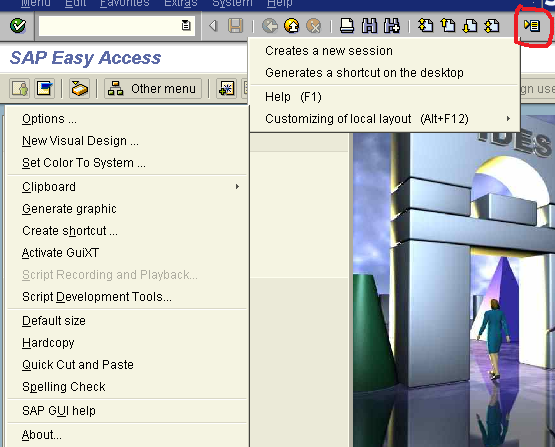


Customize Local Layout icon -> Options->Interaction Design->Visualization & Interaction->Controls

Below screen is in 4.6 version:


Saturday, October 31, 2015

Authorization group for OB52


Tcode SM30, view/table: V_TBRG.

Click Maintain button, use F_BKPF_BUP for authorization object


A posting period can be made available to only a limited set of users using the authorization group


SU01 or PFCG to display role and authorization:


Click on Display Authorization Data button


We can post a document successfully as below:


Monday, August 10, 2015

Add Functional Area Field in FBL3N

How to display Functional Area field in FBL3N?

 MAIN MENU - SETTING - CHOOSE SPECIAL FIELD 


Add the table BSEG and field for Functional Area


Save it


Click BACK button to go back FBL3N (maybe exit the FBL3N and log in again)


You can go to OB32 do same above steps.


Sunday, January 4, 2015

Create new vendor group

XKN1Create Vendor Number Range
OBD3Define Vendor Account Group + field status for master data
OBASAssign Number Ranges to Vendor Account Groups
OB23Define Screen Layout per Activity (Vendors)

Wednesday, February 19, 2014

SAP Bank reconciliation statement Configuration Steps

 Why Bank reconciliation?

Deposits in transit are amounts already received and recorded by the company, but are not yet recorded by the bank.

Outstanding checks are checks that have been written and recorded in the company's Cash account, but have not yet cleared the bank account.

Bank errors are mistakes made by the bank

Bank service charges

An NSF check is a check that was not honored by the bank of the person or company writing the check because that account did not have a sufficient balance

Configuration:

SM34; VC_T028

Define Account Symbol:


SM30; V_T028H


GL account master data:


After posting Bank Reconciliation Statement, an entry was generated to clear the open item of clearing account

Dr 112101 - Clearing account
  Cr 112200 - Bank


Wednesday, November 6, 2013

Common Error:The entry xxxx is missing in table T043G Message no. F5100

Error:

The entry xxxx   is missing in table T043G 

Message no. F5100

(xxxx is company code)


The error happens when you pay the vendor invoice, customer invoice or do other scenarios like that. This error is in F-44.


Solution:


Go to OBA3, Click New entry button to maintain data as your requirement