Monday, February 22, 2016

Create Business Partner in S/4Hana Finance


First, when you try to run Transaction code XD01 in S/4Hana Finance, system will automatically open the transaction of Business Partner with message: " Redirecting to transaction BP, as ..."


If we use transaction BP, the main screen is below:


If you would like to remove the Criteria Search for Business Partner, you can click on X button


After remove the Criterial Search, the screen as below:


Click Organization button, the screen as below:


Enter customer name


If we click Save, we will see a number for this customer.


We change the role to FLCU00 FI Customer, the company code tab will appear. This role is for creating customer in Company code level.


If we want to maintain the data in company code level, click on Company code button. Below is screen to enter the data in company code level:


We extend the customer to another company code in this screen.

If we need to maintain the data of Sales and Distribution, change the role to FLCU01


Click on Sales and Distribution button to enter the data as below:


We extend the customer to another sales area in this screen.

Create Vendor:


Role for creating vendor in company code data: FLVN00; for Purchasing Org: FLVN01


Tuesday, February 9, 2016

Project System - Integration process with Controlling


CJ20N - Project Builder, create new project definition 

(Not finish)


Bank Reconciliation Statement Process


1. Scenario:

The scenario here is talking about checks issued out

* When you issue a check to vendor:

Vendor account   Dr
   Check issued out account   Cr


* When you automatically upload or manually enter Bank Statement,  check issued out account is cleared:

 Check issued out account   Dr
    Bank account     Cr


2. Configuration:

SM34; VC_T028 - Make Global Settings for Electronic Bank Statement


Step 1 :- Creation of Accounts Symbols for outgoing checks


Wednesday, December 23, 2015

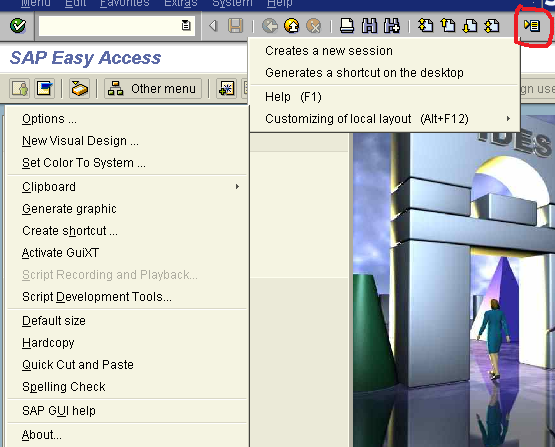
Display code and description in a drop down list

Requirement:

You need to display code and description in a drop down list

Steps:


Customize Local Layout icon -> Options->Interaction Design->Visualization & Interaction->Controls

Below screen is in 4.6 version:


Saturday, October 31, 2015

Authorization group for OB52


Tcode SM30, view/table: V_TBRG.

Click Maintain button, use F_BKPF_BUP for authorization object


A posting period can be made available to only a limited set of users using the authorization group


SU01 or PFCG to display role and authorization:


Click on Display Authorization Data button


We can post a document successfully as below:


Monday, August 10, 2015

Add Functional Area Field in FBL3N

How to display Functional Area field in FBL3N?

 MAIN MENU - SETTING - CHOOSE SPECIAL FIELD 


Add the table BSEG and field for Functional Area


Save it


Click BACK button to go back FBL3N (maybe exit the FBL3N and log in again)


You can go to OB32 do same above steps.


Sunday, January 4, 2015

Create new vendor group

XKN1Create Vendor Number Range
OBD3Define Vendor Account Group + field status for master data
OBASAssign Number Ranges to Vendor Account Groups
OB23Define Screen Layout per Activity (Vendors)